

The Real Reason You’re Always Busy But Never Moving

By Eloiza Mariano Serate
Ever felt like your to-do list has a mind of its own—and it’s winning?
Let’s be real—poor workflows don’t just slow down your business. They lead to missed deadlines, stressed-out teams, and opportunities slipping through the cracks. If you’ve ever said, “I’m so busy, but nothing’s moving,” this blog is for you.
In this blog, you’ll learn how to spot workflow red flags, design smarter systems, and use ClickUp tools to turn your chaos into clarity.
Symptoms of a Workflow That’s Not Working
Here are telltale signs your current setup might be sabotaging your momentum:
● Tasks are slipping through the cracks
● You’re constantly asking, “Who’s handling this?”
● Deadlines get pushed “just one more day”
● Updates are scattered across chat apps, sticky notes, and memory
● You’re drowning in busywork, not building the business
If any of these hit home, you’re not alone. But here’s the good news: fixing your workflow doesn’t mean starting from scratch. It means creating systems that fit how you work best.
What a Good Workflow Looks Like
A solid workflow feels like momentum. It’s:
● Visible – You can see what’s happening, when, and by whom.
● Repeatable – The steps are documented and consistent.
● Flexible – It can grow with your team and priorities.
● Aligned – Everyone knows the goal and how their part contributes.
Good workflows don’t just help you “get things done”. They free up your brain for strategy, client care, and big-picture thinking.
The ClickUp Way: Dependencies, Automations & Dashboards
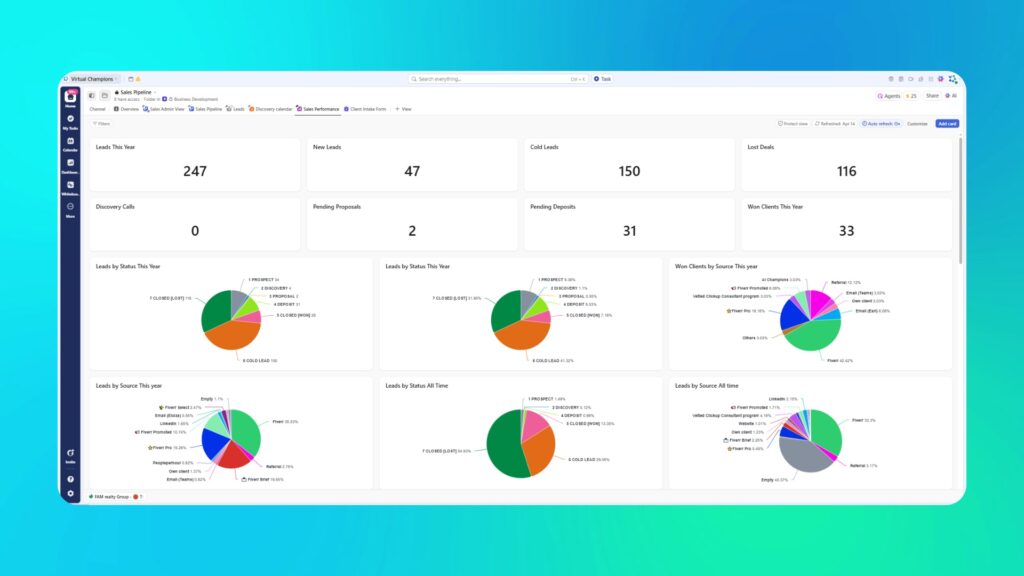
At Virtual Champions PH, we live in ClickUp. Why? Because it lets us build workflows that are actually usable.
● Dependencies: These show what needs to happen before something else starts. Perfect for onboarding, launches, or creative processes.
● Automations: No more manual status updates or “pinging” team members. ClickUp automates it for you.
● Dashboards: See everything at a glance—from workload to due dates to goals. Total clarity, zero overwhelm.
ClickUp isn’t just a task manager. It’s a central hub where your business breathes.
How to Map Workflows with SOPs
Here’s the thing—even the best tool won’t save a messy process. That’s where SOPs (Standard Operating Procedures) come in.
To map a workflow:
1. Start with the end goal. What’s the result you’re aiming for?
2. List the major steps to get there. Think big picture first.
3. Break steps into repeatable tasks. Assign who does what, when.
4. Document it. Inside ClickUp, Notion, or even a Google Doc.
5. Test and tweak. Systems evolve—and that’s a good thing.
Example: Instead of saying “post on social media,” your SOP might include:
● Write caption
● Design graphic
● Schedule post
● Track engagement
SOPs turn vibes into visuals. Your team will thank you.
Common Mistakes to Avoid
Building workflows can feel overwhelming, but you don’t need perfection—you need progress. Watch out for these pitfalls:
● Overcomplicating the process
●Skipping documentation (“I’ll remember it” never works)
●Not involving your team
●Treating your system as static (It should evolve!)
Remember: the best system is the one you’ll actually use.
Ready to Make Your Workflow Work for You?

If your business feels like it’s running you, it’s time to take back control. Book a workflow optimization consult with us at Virtual Champions PH. We’ll help you build a ClickUp system that fits your brain, your biz, and your big goals.
Being busy without progress is usually a systems problem, not a motivation one. Our SOP Documentation helps turn scattered tasks and half-finished workflows into clear, repeatable processes that actually move your business forward. When your steps are documented and aligned, momentum finally replaces overwhelm.
And once those SOPs need to live inside a system your team uses every day, our ClickUp Consulting and Implementation brings everything together with clarity and visibility. If you’re ready to stop spinning your wheels and start building real traction, contact us and let’s design workflows that work as hard as you do.
 Feeling stuck in constant motion with zero progress? At Virtual Champions PH, we help founders untangle workflows and design systems that actually move the needle.
Let’s turn your chaos into clarity.
Want to hear the latest news about Virtual Champions PH?
This could be the start of something awesome! Subscribe to our newsletter. Stay updated with exclusive tips, articles, new product tools and notifications, as well as special service offers from VCPH conveniently in your inbox!
